The HeliOS Project is now.....

The HeliOS Project is now.....
Same mission, same folks...just a different name

Search the Blog of helios and all comments

Loading

Sunday, February 13, 2011

Meet our competition...Austin Rock A Charity.

I can be a pretty competitive guy, especially when it comes to bringing funding to my project.

But sometimes you have to step back and appreciate the efforts of others.

Three Austin non profits will compete for funding at the February 18th Rock A Charity event in Austin Texas.


 English At Work

HeliOS Project

Well Aware

First off, our thanks to Link Coworking and Austin Involved for putting this event together.  They did a fantastic job of bringing sponsors together to make the a successful event.  Liz Elam and Courtney Clark have worked their backsides off to make Rock A Charity a reality.

The fact that some people in the Austin community realize there are worthy charities out here in need of funding is encouraging.  These folks have planned an event that will allow the above-mentioned non profits to compete for some of that funding.

"The goal of RockaCharity is to raise awareness and money for local charities while also helping them perfect their elevator pitch. Guests to the event will donate a minimum of $20 for a rock. Guests will then visit three of the small meeting rooms at Link Coworking and hear pitches from three charities. In another meeting room, guests will cast their vote for whom they believe is the most deserving of their donation. At the end of the night we will announce the winner who will receive 50% of the money raised. The remaining charities will split 50%."

We've spent a couple of weeks talking about our part in Rock A Charity.  Let me introduce you to the other non profits that will be in attendance that evening.

"English at Work is an Austin, Texas-based nonprofit whose mission is to provide essential language instruction at the workplace in order to increase employees’ opportunities for improved quality of life and to increase employers’ competitive advantage.

The organization’s vision is to build a community where language proficiency gives all people access to opportunity. To achieve this vision, English at Work engages employers and employees in the curriculum development process, creating lessons that are specific to the workplace. Lessons are also specific to Austin and incorporate local bus schedules, information on public officials, and visits from English at Work partner agencies."

Well Aware is a 501(c)3 nonprofit organization formed in 2006 to provide life-saving water for the people of rural Kenya. We are a grassroots group of Austin-ites reaching out globally for a solution to the suffering caused by water deprivation in parts of East Africa.

The most severe drought in their history has claimed more than just the traditional livelihood of rural Kenyans. Most children no longer attend school because they must walk all day to find water that is not sanitary. Savagery and tribal warfare has increased dramatically due to competition over resources, and community leaders are abandoning their villages altogether in shame for being unable to provide. But the most tragic of the victims are infants, 25% of whom will not survive.

This does not have to remain the case. Access to clean, safe drinking water will return them to prosperity.

We had the privilege of meeting some of the folks from both of these non profits last Friday and it is my sincere pleasure to be included with these fine organizations.  My best wishes to both of them during the evening.  I don't think anyone will come out a "loser" on the 18th.  Just knowing there are such caring people here in Austin is enriching to me.

All-Righty Then


Saturday, February 12, 2011

Headless Chickens Come Home to Roost

It's not like people did not see this coming...but somehow, this issue recently dropped like a bomb on the residents of Austin Texas.

And stay with me here...this will get to the subject matter this blog works toward.

In the face of a 50 million + dollar budget shortfall, The Austin Independent School District Superintendent is recommending the layoff of 1017 teachers and varied staff.


This, according to the Superintendent, would free up 53 million dollars.

That's the problem when you have bean counters as your advisors.  As long as the dollar columns line up, the easiest solution should be the one deployed.  As long as the money is right, then the ends justify the means...and the added bodies to the unemployment lines.

I'm not saying that the Superintendent took this route...but if it looks like a duck...until there is clarification, then all theories are pliable.

First off, let's keep the politics out of this. I'm not going to let this degrade into a Republicans vs Democrats thing.

It runs deeper than that.  Much deeper.

This is a matter of short-sighted planning and ignorance on all sides.

I am a political layman.  I despise politics and all the infighting and ego that comes with it.  Naive?  Yes.  I am naive when placed in the political arena.  But there are times when common sense should wield sharp elbows and knock unnecessary players out of that space.

From the comments  -  "...While you may detest politics, they are still very much present in the equation...Do they once again raise property taxes and evoke the ire of every voter in that district or do they lay off a thousand employees whos stories will be forgotten in two weeks?" -  
Anonymous retired School District employee
 

In the first place, I would suggest that AISD live within their means.  The AISD headquarters now resides on a 30 million dollar piece of prime real estate on 6th Street.  Real estate that would be purchased quickly by commercial developers.  As of now, many Austin students attend classes in "temporary" buildings...prefabricated and aging "portable" buildings that should shame the administration of this school district.

My daughter, thankfully, is graduating high school this year.  I have personally attended parent-student meetings in these buildings.  Many of the ceilings are bowed, the doors have to be slammed in order to close and they are grossly inefficient from a heating and cooling standpoint.


I have an idea...to save money, why doesn't AISD move their headquarters into a series of these "portable" buildings...in say, oh I don't know...East Austin?  The real estate costs there are low and they could save millions by doing so.  Sure, it would take a while to realize their savings...


While we're on the subject of planning ahead to save money...

 In 2006, I started a personal campaign to find out what AISD was spending in software.  Since I am a Free Software (Open Source) guy, it seemed to me that adopting an Open Source solution could at least help with lowering the overall operating costs.

Cue up the crickets chirping and lonely-blowing-wind sound effects.

After badgering enough people, by 2008, I finally got through to someone who was able to give me the answer and she would be happy to give me access to that information.

For a $2000.00 administration fee.

Really?

Yeah, really.

So I attended various PTSA (Parent Teacher Student Association) meetings and presented my ideas when I could.  There was a large amount of support within those meetings of at least exploring the idea, but that's where it died.

The magic sword that protected the disclosure of software expenditure costs turned out to be the vendor agreements AISD signed with Microsoft and other various software companies.  At least, that was what I was told and to be honest, I had neither the time or resources to pursue it further.

Filing for this data under the Freedom of Information Act of 1974 was impotent.  It seems our laws, the way they are currently written, gives the corporates protection...

Even if federal law says differently.


However, a seemingly disconnected event in 2008 was able to dislodge some of this information.  Maybe not as much as I wanted, but enough to sharpen the pencil and do a bit of cipherin'.

Many will remember the row that ensued after an AISD teacher admonished one of our HeliOS kids and myself for him bringing a laptop and Linux disks into her classroom.

And no...no direct citation is needed.  I'm not going to link-bait my own story.  However, this not only went viral in hours, many online and dead tree newspapers picked it up as well.

It is within one of those that we can discern some important figures.

The AISD IT Director at that time defended their IT structure by saying that 1/3 of their computers ran software other than Windows.

"...and while the district uses Windows on 24,000 of its 36,000 computers, it uses Linux for many of its servers and open-source applications, such as Open Office, whenever possible."

OK, great...Linux is obviously the superior choice for server deployments, but if we were to dig deeper into that statement, how many of the OS choices are Linux?  I am guessing that the majority of them run Windows with some Open Source solutions installed therein.  The article does mention the use of Mac computers as well.  Oh, and those aren't expensive...

But Linux desktops?

I am guessing about 27...maybe....but I am an optimist.

"When asked about the possibility of dumping Windows in favor of Linux, AISD technol­o­gy director Gray Salada said that in terms of a cost-benefit analysis, it simply isn't worth it. Windows comes preinstalled on most computers, he said, so there is little savings to be realized from removing it and incurring the costs of retraining teachers and the district's 12 engineers, who are already proficient in Windows, to support Linux."

And therein lies the problem within the Austin Independent School District.

Don't think long-term...and for Heaven's sake, don't extend the life of a good computer.  Buy new ones at all costs.

"Windows comes preinstalled on most computers..."

So I am guessing they are paying the Microsoft Tax on every computer refresh that comes along on the calendar?  Are these older machines being re-deployed within the system?  Again, I am guessing since no one will give me any specifics on these particular question-sets.

And if these machines are re-deployed, are they being upgraded to a newer Windows OS at taxpayer expense?


From The comments  -  "Ken, the administration listens to whatever compu-babble the head IT guy spews out. They will pay any amount of money necessary to keep things working and if the head guy says we need to spend X amount of dollars on MS licensing, then we spend it. He is never questioned nor does anyone care. As long as things are running smoothly on the surface, they will spend the money he says needs to be spent as long as they don't have to deal with it."
 - Anonymous currently employed IT specialist within a Texas school district

After all, I am simply a lowly taxpayer with a child in their system.  What right do I have to know as to how they are spending my money?

Time and time again, Linux and Free Software have provided The Enterprise, Governments and individuals amazing cost savings over the long term.

A recent conversation with Amazon tech support concerning our store account  revealed that most of the desktops used at that call center ran Suse Linux.  They made the switch a couple of years ago.  Amazon is thinking long-term.

But AISD isn't thinking long-term.

24K of those computers are running Windows.  Even at their licensing costs of maybe $50.00 per machine, how much money could they save?

The math is simple.  $1,200.000.00

That isn't taking into consideration the cost for support software like anti virus applications.   

How many teacher's positions could be saved by that alone?

Yeah, yeah...cost of training, cost of adaptation...

If this had been done in 2006, would it have made a difference today?

I am thinking so.  Just ask those in various Indiana School Districts.

"We have a million kids in the state of Indiana," he continued. "If we were to pay $100 for software on each machine, each year, that’s $100 million for software. That’s well beyond our ability. That’s why open source is so attractive. We can cut those costs down to $5 [on each computer] per year.".

So while AISD accountants may consider these savings a "drop in the bucket", they don't realize that after a few years, those drops add up to a quantitative amount.

That doesn't matter right now...it appears they're in panic mode, running in circles with their hands flailing in the air.

They'll lay off or fire 1000+ teachers and staff members to get this monetary monkey off their backs....for now.

I'm guessing that in 5 years, we will be revisiting this crisis.

Lather, rinse, repeat.

My organization has deployed over 1200 Linux-powered computers to disadvantaged Austin students since 2005.  I don't want to hear how "Linux doesn't work".  It works fine and has proven to be superior in both performance and security.  Sure we use some MS-only software via Crossover, but that's another advantage of Linux.  We can and we do so without the inherent cost or peril of a native windows operating system.

Look, I'm not suggesting that this should happen overnight, nor am I silly enough to think that Linux on the desktop would solve all their woes.  What I am saying is that if the State of Indiana can do this, then it's not out of the realm of possibility for AISD to do this....at least do a feasibility study.  Look for vendors that offer Linux on the desktop. 

There is the matter of critical Windows-only software...yes I know, but I also know that there are other such Free Software solutions such as Moodle.  There are hundreds of Open Source software solutions that meet or exceed their Windows counterparts.  The people making the IT decisions simply have to have the will to look into it.

Of that, I am not hopeful.

From the comments  -  "I am a recently retired teacher from AISD. You might want to ask them what they pay in licensing costs for their Blackboard software."
Anonymous retired AISD teacher

Many of the financial injuries that the Austin Independent School District suffer are self-inflicted.  Mind the pennies and the dollars will take care of themselves.

All-Righty Then...

Thursday, February 10, 2011

Know Thy Machine...

Giving someone a computer is one thing....sure you've given someone a tool to participate in current technology...

But making sure they know how to use that tool is just as important.

If not more so.

We recently set up a series of classes at the Bruno Knaapen Technology Learning Center.  The classes were more for the parents and adults than our kids.

Trust me, our kids get the computer.

Adults not so much...at least the ones we encountered that night.

And before I go any further, my sincerest thanks to Christina Collazo for doing the English to Spanish translation.  The majority of our class that night were native Spanish-speakers and our session would have been a Tower-of-Babel failure without her presence.  Thank you Christina.

I went into that classroom with the intention of teaching basic Internet and search skills but as the class started, I realized that many of the things I was saying were being met with quizzical or blank stares.

Stuff like:

Focus your mouse and do a ctrl A key combination.


Copy that line and paste it into the address bar.


Bookmark this for later, we will visit this page again.

It dawned on me that this classroom of people, ranging in age from 30-60 didn't have a clue as to what I was saying.

What was intended to be a quick class in how to browse and search turned into a "computer 101" session.

We started from the beginning.  With Christina, myself and other volunteers, we began circulating among the individual students, showing them keyboard shortcuts, showing them the difference between left and right mouse clicks, explaining tabbed browsing and a basic introduction to a browser and its function.


As we spoke to these people, they scribbled quickly on their note pads and as we discovered specific issues or commands that many of them struggled with, we did whiteboard notations, explaining them more fully.

I think what impacted me mostly was the amazement and personal revelation these people exhibited when we showed them simple ctrl A, C, D and V commands.  It was like the clouds parted and the angels sang.

Well...not really.  I personally did not hear the Hallelujah Chorus that night, but it was close.

So I suppose the main point of writing this is to remind us that we cannot take basic computer skills within anyone as a given.  We had one young lady tell us that she had literally typed in entire paragraphs that she wanted to send to someone in an email.

Showing her copy and paste was to her, a miracle.  Simple things like demonstrating the scroll wheel on a mouse, implementing mouse gestures in Firefox and additional keyboard shortcuts can mean ending months or years of frustration and open up an entire new attitude in using a personal computer.

Those people were not the only ones to learn valuable lessons that night.  I learned that it's the simple things that pave the way to the greater.

Maybe this is a lesson many of us can take to heart.

Maybe there are others counting on us to do so.

All-Righty Then

Tuesday, February 08, 2011

The HeliOS Project Gets Stoned

I haven't used the term "stoned" for decades. 

Ahem...and only in a third-person context of course.

I can't remember where I left that word...I think it was in the same decade I dropped off phrases like "groovy" and "far out".

They are at home there....along side my paisley shirts, my bell bottom jeans....

and my hair.

None the less, The HeliOS Project fully intends to "get stoned" on Friday night, the 18th of February at 7 PM.  It's largely due to your efforts that we will do so.

As we announced last week, we were invited to compete in the Austin Rock a Charity event here in Austin.  To get a place at the table, we had to be one of the top three Facebook pages to gain the most "likes" in a 48 hour period.

Thanks to many of you, we dominated that competition.  We logged over 1100 votes in that period.  Now look...I have some issues with Facebook.  The privacy issues are well-known with that social application.  With discretionary funding for non profits drying up like a puddle in Death Valley, we sucked it up and took part in the competition.  We'll take legitimate funding anywhere we can find it.

Now that we earned a presence at the event, here is how it works and where it will take place

View Larger Map

Initially, this was to be an online ticket event, with tickets to be sold to anyone wishing to attend.  This has been changed and admission tickets may or may not be charged...I am waiting to get clarification.  The charities being represented all have large followings and the Austin Fire Marshall has capped building capacity at 200.

Only the first 200 people at the door will be admitted.  Once they get inside, they will be treated to an open bar and some excellent catering.


 Party-goers will be given a chance to purchase small rocks for $20.00 (hence "rock" a charity) and they will be asked to drop their rock into a fish bowl that represents a particular non profit.  At the end of the evening, the charity with the most rocks in their bowl will take home 50 percent of the total.  The other two will split the other 50 percent.


 Diane Franklin, Skip Guenter and myself will be representing HeliOS in one of the three conference rooms set up for each non profit.  We are also pleased to announce that Middy Flores will be in attendance representing on of the 1241 computers we have installed for kids that need them.  We will have our display set up and will be given a chance to "pitch" our cause, along with the other two participants.

I realize that it was an international effort to get us a place at this event, even though this is a local event.  My sincere thanks goes to the folks that got us in the door, and that was all I asked.  You get us in, we'll do the rest.

My deep thanks to Jeff Hoogland, Steve Rosenberg and the great folks at OMG Ubuntu.

If you are local to Austin, we would deeply appreciate you coming by and help us get stoned that night.  Please pass this along if it is relevant to you.

Oh, and speaking of "that decade" where "groovy", "stoned" and "far out" went to live?  Here is something my oldest son has been holding for the perfect blackmail opportunity.  I guess I'll beat him to the punch.  I don't know which is more embarrassing...the 1964 Studebaker or the pants.  I'll let you decide.  1969 was a very good year....

Or not.

And as always, thanks for helping us do what we do.  We could not do it without you.

All-Righty then

Friday, February 04, 2011

It's About Rythm and Structure.

I'm willing to bet I might be a bit older than many people who read this blog.  Some by not so much, and I know I am junior in age to a few.

It's probably to those few that this will make the most sense.

I grew up watching television in the late 50's and early 60's.  It was back when there were two knobs on huge TV consoles that dominated a relatively small screen.

A black and white screen up until sometime around 1968.

Those two round knobs controlled the channels.  The top one usually controlled the VHF channels, which fed the 3 major networks and the bottom button was the magic, smoothly-turning knob that introduced you to UHF.

Clunk, clunk, clunk...

That's the sound the top knob made when you turned the stations.

To complicate matters, if you changed channels frequently, the plastic nub that the knob fit onto would eventually get rounded off. You had to use a pair of needle nose pliers to change the channel.  I remember that stripped-out knob sitting on top of our TV for years...

Along side that set of needle nose pliers.

As far as gaining reception and signal?  It was done by a set of "rabbit ears" that generally sat on top of the TV.  People with money had roof antennas.

And for you folks that wonder how we got by without remote controls?

We had them...

"Turn the TV to Lawrence Welk boy and get me another beer..."

Kids were the first remote controls invented.

But TV wasn't really that bad back then...but then again, if you don't know what you are missing....well, you don't miss it.


I remember memorizing when my TV shows were on.

Captain Kangaroo

Howdy Doody

Rescue 8

Rin Tin Tin

Sky King...

Many shows aired live, with all their bloopers and imperfections and baseball players could be seen smoking cigarettes in the dugout.

I knew when they were on, what channel they were on and I checked my cheap little watch as we kids played outside, making sure I didn't miss anything.  Serial shows ran for 22 episodes and they all ran at once, usually beginning in September and ending in late spring.

Then there was "rerun summer".

There was a pattern, a rhythm and structure to it all.

Today not so much.

I still watch TV.  Howdy Doody has been replaced with Fringe, Sky King with Human Target...


But the types of TV shows isn't the only thing that's changed.

Seasons of a particular program might run 13 episodes, maybe 10 if it's just a seasonal replacement for something else.  Many shows switch the day they air like most of us change shirts.  TV shows don't run in parallel anymore.  One show might start a new season in January, others in April.  Most of them have adopted the infuriating practice of taking a "mid-season break", lasting as long as 90 days.  Even award-winning programs like "Breaking Bad" make their viewers wait almost a year for a new season.  You have to create a database just to keep track of what's going on.


Yeah, cable has changed things.  The advertising dollar rules most decisions.  Technology has prevailed and given us choices we couldn't imagine when we were kids.  Hell, some of us even remember what a record is.  Do you realize that most of the people I deal with don't understand the context of the saying...

"You sound like a broken record"?

So now I understand.

Some of us have rode the tech wave into the present.  In place of the promised flying cars and video phones we have the PT Cruiser and The Internet.

Many of us have taken a keen interest in technology, we choose to.  But as I mentioned in a less than gentle way recently...

Some people don't want to.

Sky King and Rin Tin Tin are fine for them.  It's what they know, it's within their comfort zone and even if Burn Notice is a better show, they don't care.

They don't feel a need or a want to immerse themselves into it.

Timmy will fall down another well, The Captain will get another bucket of ping pong balls dropped on his head and Sky King will catch the bad guy every time.

It's comfortable, it's predictable and it's what they know.

Even though they know the channel will fuzz out or fail from time to time, they are willing to deal with it. Walter Cronkite will set things straight.

No amount of telling them how good something else is will sway them.

Maybe they like hearing clunk, clunk, clunk when they turn the TV channel.

And I guess that's ok.  Sometimes I wish Lassie would come home too.

All-Righty Then.

Tuesday, February 01, 2011

Click a Link - We Get Money....Maybe.

As with many non profits, discretionary funding has become hard to find.  The HeliOS Project is no different.

For those that don't know, The HeliOS Project takes broken or decommissioned computers, refurbishes them, then we give them to disadvantaged kids Austin and the Central Texas area.

Most of the grants available to us are for equipment.  I think what I find most ironic is the push to give us computer equipment for our office and logistic operations.

I believe we have that covered.

Money on which to operate has largely come from you.  But this time, we are not going to ask you for anything...not a dime.

We just need you to click a "like" button.

We have been chosen to participate in an Austin event called Rock A Charity.

Here's how it works.

Non profit contestants will have their Facebook page monitored for "like" clicks for a 48 hour period beginning on February 1st at 9 AM CST.  At the end of that 48 hour period, the top three charities with the most likes will then be invited to a party on the 18th of February.  Any clicks prior to or after this 48 hour window will not count.  The contest ends at 9 AM CST on Thursday, February 3rd. 

During that party, donors will be able to "purchase" small rocks.  There will be three conference rooms set up, each one representing a charity. Those conference rooms will have a table and a fish bowl in them.  The rock holder chooses which charity he wishes to support by dropping his rock in that non profit's bowl.

At the end of the evening, each bowl is tallied and the winner receives the total amount of money from all 3 bowls.

This is a great chance for us to gain some of the funding we badly need and all we need from you is the clicking of a "like" button.

Skip Guenter, Diane Franklin and myself will be attending the party and we will introduce donors to our non profit.  Even if we don't win, it will gain us valuable networking time with those that might be interested in funding The HeliOS Project in the future.  If you would like to come to the party and help represent us, contact me via email.  helios at fixedbylinux dott komm

You can simply click the "Like" button on the Facebook app at the top-left of this page, or you can go to our community page and do so.

It wouldn't hurt our feelings at all if you tweeted/Facebook'ed this for us.

All we need is for you to get us through the door...we'll do the rest.

All-Righty Then...

Monday, January 31, 2011

Why We Insist on Linux on the Desktop

Just a note...when you click the "like" button on the facebook ad on the right, it enters us into a contest where we could receive a ton of help from local businesses. No votes count until 9 AM CST so watch the clock.  The facebook button will appear at 9 AM CST.  Just a click...that's all. Thanks for helping us do what we do. - h

The title to this article could just as easily have been, "Why We Don't Use Windows."

Besides being inflammatory,...well, that's reason enough.

Far be it from me to ever publish anything controversial.

The fact remains, we do insist on installing Linux with every computer we give away.

Sure, there are the philosophical reasons.  As well, there are financial incentives to do so, but in my world...in the world of 1-3 computer installs every day of the week...

I simply don't want to be bothered with those problems associated with the use of a Windows computer.

Now look, there have been computers we've installed sporting Windows.  Some of our kids have Windows-specific application needs.  Giving a child the wrong set of tools is as bad as not giving him any at all.

It doesn't happen often but it does happen.  When this is necessary, I purchase the Windows License out of my pocket.  At the same time, we tell the child and parent that we will not support virus or operating system failures.

We can't...we don't have the resources.  Some of these machines are deployed 75-100 miles away.  We simply cannot support an operating system that will surely develop often and well documented problem-sets.

Those Windows installs have now come to a halt.  Between the ease-of-use of VirtualBox and Codeweaver's generosity, we now have alternatives to installing Windows.

We deploy Crossover judiciously as we don't want to pass around this great program willy-nilly.  While Codeweavers is not in the business of giving their product away, they have granted us permission to install in on our kid's computers when necessary.

Oh and by the way, Codeweavers has released their latest effort, codenamed Impersonator.  The improvements are largely in the way Crossover handles the installation of Windows apps and the "support" for apps that haven't appeared in the "supported" list.  I test drove it the day it came out and I am impressed.  For the price, it delivers way past the initial investment.

The reasons we focus on giving our computers to children should be obvious.  As well, there are reasons we vastly curtailed giving our computers to adults.  Let me 'splain...

For a year, we were listed in the City of Austin's "211" program.  This is basically a telephonic and online database of community services.  We began receiving calls from Veterans Aid groups, among other organizations, asking us for help in providing veterans with computers.

Let me tell you why we are no longer in that database.

We were referred to a lady...let's call her Elaine.  Elaine had completed rehabilitation training and was currently being enrolled in a junior college to gain an associates degree.  We gladly complied with the request and I personally delivered the computer to her and spent over an hour just showing her how to use the system.

All seemed well.  Our 30 day and 60 day check-back calls were met by her answering machine and since we never got a callback, I assumed things were spiffy.

We had also supplied a computer to a veteran in the same complex, in fact, just a few doors down from Elaine.  It was only later that I found that they were friends.

On our 60 day check-back with this other lady, I asked her if she knew how Elaine was doing with her HeliOS Project computer.

She made a disapproving sound into the phone.

"She hated it." The friend stated.  "All she did was bitch about how she couldn't do this or couldn't do that.  Even after I showed her how to transfer her digital photos from her camera to her computer and showed her how to save documents in .doc format, she still complained."

Her basic gripe?

It wasn't Windows.

It didn't matter that she could effortlessly access her college websites.  It didn't matter to her that she could do every function on her Linux machine she could do in Windows.

It wasn't Windows and therefore it sucked.

As soon as Elaine got a settlement check from the VA, she went out and bought a brand new computer, "complete" with Windows.

Fair enough.

I called Elaine and told her that I knew she had bought another computer and that I was authorizing her to release the one we gave her to her friend.  I would pick it up from there.

I got the call from her friend within the hour and had the computer in hand by the end of the day.  And for the record, the machine I gave her was a Core 2 Quad Q6600 2.4 GHz Quad Core Processor with 3 gigs of RAM, a 160 gig hard drive, DVD/CD RW+- with a Dell 525 2.1 speaker system.


And to be honest, this was pretty much the last straw.  We had received calls from numerous 211 recipients that they had installed Windows on HeliOS machines and then needed support in getting rid of malware and viruses.


One guy said he was getting a black screen on boot, telling him that child porn was present on his computer and unless he made a payment to "unlock the machine and delete the filth", they would report him to local police.


This is not a common malware occurrence.  I've only seen it once in the wild but does exist.  Regardless...I wasn't touching it.


The fact remains, at least in my mind...Linux is a wasted effort on most adult computer users.  Our efforts are best spent in providing for and educating kids in Linux and technology.  Between the little snits and the landslide of virus complaints from users of Windows, it's gotten pretty discouraging.


Kids don't have any philosophical or political concerns when they sit at a keyboard.  They still have open minds and are able to assimilate different ideas and use them.


To my eye?  Adults not so much....with a few exceptions


All-Righty then


Tuesday, January 25, 2011

Texas Linux Fest Seeks Koha Guru

The first Texas Linux Fest was, by most measures, a success.

Personally, I attended as a voyeur...attending many of the talks and I caught Joe Brockmeier's keynote.  Something I enjoyed throughly.  I also messed around and learned some things...both about Linux and the people that breath the rarefied air at the top.

My hat is off to Nathan Willis and others who made it happen.

2011 promises to raise the bar.  A recent call for papers was announced and the TLF team is now sifting through the huge pile of submissions, trying to lay out an informative and entertaining event.

No doubt they will succeed.

Nate contacted me recently and asked me if I knew anyone who used or was familiar with Koha.

"Koha is a Full-featured ILS. In use worldwide in libraries of all sizes, Koha is a true enterprise-class ILS with comprehensive functionality including basic or advanced options. Koha includes modules for circulation, cataloging, acquisitions, serials, reserves, patron management, branch relationships, and more. For a comprehensive overview of features visit the Koha feature map."

The TLF is interested in having someone talk about Koha during the 2011 event.  Texas Linux Fest will kick off on the 2nd of April and run through the weekend.  Here are some important dates you might find useful.

  • January 17: Call For Papers opens
  • February 14, 11:59 p.m.: Deadline for proposals
  • February 25: Last date for notification of submission acceptance

If you are interested in presenting information about Koha, visit the above link for call for papers and we'll get the spotlight set up for you.

All-Righty Then...

Tuesday, January 18, 2011

Of Software and Soffits

Welcome to Guest Tuesday.  On any given Tuesday, we publish submissions from people in the Linux or FOSS/Tech communities.  Skip Guenter has been kind enough to forward this piece and I think it's a pretty informative offering.  It needs a bit of an intro then we can get down to bid'ness.  Thanks Skip.

Before I began writing this, I spent various clusters of my day trying to find a quote.  I can't remember who said it but I remember it was someone pretty high up in the Linux Community.  His statement was fairly definitive.

Sourceforge:  The place where good ideas go to die.

Huh.

I peruse that vast resource from time to time, but not often.  Most of what I need is regularly found in the various repositories for my distro.  Rarely do I have to go outside of those to find what I need.

Recently, was one of those rare moments.

In actuality, Skip Guenter, our Director of System Engineering was the one who made that trek....in search of a specific software app to do a specific job.

I'll let him tell the story...he was the guy who did all the work.  Here it is.


I recently had an immediate need to do a rough floor plan for a possible future HeliOS shop location. I was asked to draw out a usage plan for an existing building, and was handed a 8.5” x 11” photocopy of what looked to have been a hand drawn floor plan on a sheet of graph paper.

Having zero experience with CAD software and limited exposure to Visio, my first step was to see what showed up when I did a search in the Synaptic Package Manager on my desktop (Ubuntu v9.10).

I found what looked to be a likely candidate and installed it. This gave me an icon in the “graphics” group in my application menu. A good start.

However clicking that icon started up something that I played with for the next 45m~1hr and still didn’t have even my first “wall” drawn. I couldn’t figure out how to do anything in this. It was a bit like the very first time I started up GIMP... only worse.

Before resorting to a hard pencil, some graph paper and my old metal “print ruler” from my mainframe programming days I decided to try some “googling’ for “floor plan Linux”. The top entry was a link to a Linux/BSD thread on forums.whirlpool.net.au. In the first page of posts was someone recommending SweetHome3D complete with a link.

I spent the next few minutes reading the site and came to a page where I could actually operate a version of the software from my browser (Firefox). I didn’t spend too much time because they tell you right up front that you have to register (free best I could tell) to be able to save files. At this point I still wasn’t very confident that I could produce what I needed in any reasonable amount of time but I looked for a download link on the off chance I produced something I wanted to print.

Again to my surprise I found a link for Linux 64-bit but alas, no .deb or .rpm files.

Editors note...if anyone is interested in trying to package this as a deb file for Ubuntu and derivatives, that would be cool...

Once downloaded you get a .tgz file and you just extract the archive to where ever you want the package to live. For now I decided to “install” it into my home directory. No fancy installer here boys and girls. Unarchive it (using folder names) and you get a directory called SweetHome3D-3.0

If there’s a way to install it, complete with a menu entry in the apps menu then I missed it. Inside the created directory is a script file called SweetHome3D that will start the app up. I right clicked on my desktop and created a launcher for it.

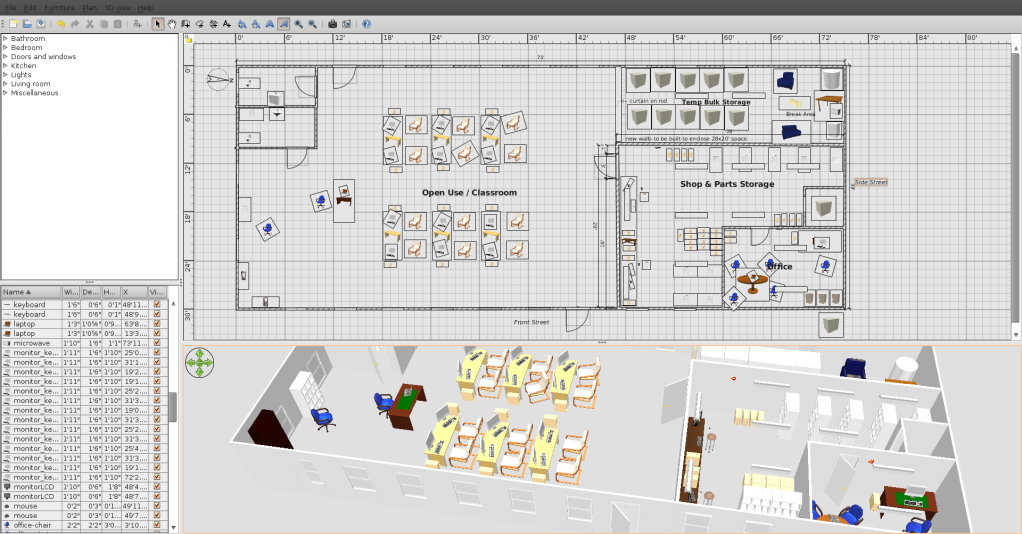
Now here’s the really amazing part. In just a few minutes I was actually able to draw all my exterior walls and add a couple of entry doors that were shown on my photocopy source. Now I had a starting point. After getting a couple of new interior walls added that we would need to use this building, I started adding furniture type items. Work benches in the shop. Shelves in the storage area. Desks into the office. Some tables in the class room area. I actually placed sinks and toilets in the bathrooms and then even put computers next to the classroom tables. Monitors and keyboards on the tables. The whole thing is all drag and drop oriented. This was almost fun.

You can also modify the object in the library (all future usage) or in the floor plan (current usage only). Modifying an object in the library however does NOT update the instances of that object in the floor plan, though, so make sure it’s right before you drag 20 of them into your floor plan.

One of the things I really liked about this software was the viewing angle adjustable perspective (3D) image in the panel below the floor plan I was working on. It was being updated as I made changes. This allowed for a reality check to see that the object, say a table, actually appeared to be sized correctly..

On the SweetHome3D website I found several things I could use that didn’t come with the default package. Like 4 foot florescent lights, some other types of shelving and an office style desk. I especially liked the “Ubuntu wall clock” I found. You just download the .zip file someplace and then from the furniture top menu item select import furniture and point it to the .zip file. The SweetHome3D app will allow you to import individual objects (as I did) or entire libraries of objects. The process is pretty simple and is explained on the website.

By default the objects are grouped into categories called Bathroom, Bedroom, Doors & Windows, Kitchen, Lights, Living Room and Miscellaneous. I put all the objects I downloaded into the Miscellaneous group.

The SweetHome3D website lists over a dozen other sites where you can download more objects or collections of objects.

I liked the fact that I could change the name of an object to call it by the name that I know the item as (Desk vs. Bureau). If you want something to be above floor level, like my 4-foot fluorescent light strips, you need to set the elevation of the object. Other objects, like a laptop, you can set down on top of a table or desk.

All the object size parameters can be specified in metric or in SAE measurement units. A text box can be placed anyplace on the floor plan but seems to be limited to horizontal orientation only. Size can be modified and can be set for bold or italics but that seems to be about it.

Now for my purpose, creating a floor plan quickly and sending the result to someone who probably does not have this software, SweetHome3D was able to print my floor plan on my default printer (a Samsung mono laser) without any issues or special set up. It also has options to print the 3D image and a list of all the furniture and other objects used, if this is desired. A really pleasant surprise was that it also contains an option to “Print to pdf” which I used to email my new floor plan off without having to call and obtain the fax numbers of the recipients! I’m a happy camper.

I’m continuing to play with this floor plan a bit as I’ve received some good suggestions from some of the HeliOS crew once I emailed them the PDF of my floor plan and 3D image. I know there are a lot of other features that I haven’t touched... like locking down a base plan, importing complete models, messing with the compass, etc. etc. I haven’t even read anything yet on how to create new objects but I suspect you might do that outside of this tool.

In fact, as I was writing this I found out that I can take the panel that contains the 3D-image and make it a separate window, allowing me to float it over my floor plan. But , to switch back to the floor plan I have to close the window, which docks it back into a panel in my SweetHome3D window. I might like the ability to toggle between the two windows.

This tool seems to be all Java based so expect the occasional slight hesitation (not often and not long enough for me to complain) even on my fairly fast quad desktop with a fairly hefty video card in it. Mostly when flipping between editing furniture objects and dragging them around. One caution; when intending to delete an object from your floor plan make SURE it’s selected on the floor plan! If you have the object selected in the library, you’ll delete it from there!

Below is a sample screen shot of the 75’ x 30’ building I was working with.


Using the “print to pdf” option gives you a page for the top floor plan panel and another page for the lower panel containing the 3D (perspective) image. I didn’t include the table of objects that you can see in the lower left of the screen, so that might be a 3rd page in the pdf had I chosen it.


In summary...

Is this real CAD software? From what little I know about CAD, No!

Is it a great, easy to use, simple to set up tool for doing quick floor plans? Yes! I am the ‘idiot test’ on doing this sort of work. This one passes with flying colors.

Skip


Thursday, January 13, 2011

How young is too young?

I recently received some mild criticism from a friend when I stated that The HeliOS Project provided a computer for a family with 3 kids ranging in age from 6 - 9 years old.

He said that we had wasted a computer on kids that were far too young to either appreciate the technology or use it efficiently.  I don't only think he is wrong...

I know he is.

I didn't argue the point with him...he's not an educator nor is he vaguely involved in technology via his profession.  I wasn't nearly as concerned about his criticism as I was about his attitude.

I think that exposing a child to technology should be done as soon as there is a cognizant communication ability between child and parent.

I only have emperical data to support my point.

When I decided that I wanted to live and work in the computer technology field, I was fairly late to the game...somewhere around 2002.  Of course, I began my self-education on a Windows machine and as I believe most people should, I evolved to learn outside of my knowledge base.  I began to explore Linux.

My daughter Amanda Brooke was 2 when she insisted in being lifted to my knee as I worked at a DOS prompt.  We would take breaks intermittently to play pinball games and later, Childsplay and an occasional game of Frozen Bubble or Planet Penguin Racer.  We did this for at least two hours a night, 7 nights a week and we did it for years.

She squealed with delight every time tux "ate" a fish and made the popping sound.

I didn't "push" my daughter into tech, math or science...but you would have a difficult time convincing me that early exposure to technology didn't have a lot to do with it.

In fact...I don't think anyone could.

And there isn't a week that goes by that we don't hear from parents or guardians...receiving reports on how grades have improved.  Not only grades, but whole attitudes about school and education.  In a few cases, we have seen chronic truants at the middle school or high school level begin to take their studies more seriously.

I know as well as you do that many of the kids we give computers to more than likely use them for gaming and social activity....far more than they use them for academic pursuit.

We are dealing with pre-teen and teen kids after all.

But the fact remains that they now have the tools.

Skip Guenter and I do week-long computer labs during summer vacation.  The kids range from 4th to 6th grade.  When I first intro the class. I walk among the seated children and then I point to one of them and I say:

"You are going to be the first person to walk on Mars."

I point to another and state:

"You are going to discover an herbal compound that cures diabetes."

And to a third child I point and say:

"You are going to invent the nano technology that reverses blindness."

Then I make sure that they understand one thing.  Unless they embrace and learn about the machines in front of them, none of that is likely to happen.

My youngest daughter Amanda is a senior at Crockett High School in South Austin.  Since she is bound to read this and give me grief over it, I won't be a boastful Dad and blurt out her SAT scores.  Her grade average is 3 point holy-crap!

And trust me...her intelligence is not inherited...at least not from my side.

But I will tell you this.  She is being courted heavily by several major universities.  I believe she is leaning hard toward Rice.

They want her to study either sustained energy or nuclear engineering.

You go baby...you go...

While I write this, the memory wraps itself warmly around me...

The weight on my knee and the giggles as tux pops another fish.

All-Righty Then

Friday, January 07, 2011

The Right Geek Skills Can Make You a Troublemaker...

Alan Jones has traveled a long way to be here.  His route is as interesting as it has been long.  From Australia to London, a prolonged stay in Santa Barbara and then, to Austin...

What a long, strange trip it's been.


He plans to be here for a while.  He's got a sweet gig.

Alan is the R&D Supervisor for Troublemaker Studios and he works for the well-known Robert Rodriguez.  Rodriguez is a film director, screenwriter, producer, cinematographer, editor and musician.  From movies that fit comfortably into the Walt Disney template...for instance the Spy Kids movies, to gritty thrillers like Machete and Grindhouse, Rodriguez has succeeded in making movies people want to see...

And he does it with a style that is, let's say...different.

I mean Cheech Marin as a priest?  Really?

Robert Rodriguez pulls it off beautifully.

Wouldn't it be fantastic to work for someone like that?

Well, there is a strong possibility that 1 - 4 Geeks could have that chance.

Alan Jones is going to hire people with C++ and SQL talents and he's asked me to put the word out.  What follows is the call for resumes and interviews.

Me?  Please...C++ was what I got in Trig.

See below for the information about getting a gig with Troublemaker:

We are currently looking for programmers for a 3-6 month contract
on-site at Troublemaker Studios in Austin, Texas.


The following experience criteria apply

Expert level:
* C++
* Qt (4 - ideally including up to 4.7)
* SQLite 3

Familiarity with:
* Cross platform development - Linux will be the primary target, but
OS X and Windows will also be required
* Network communications (esp ssl, compressed data streams, and serialization)
* CMake

Desirable:
* CTest, CPack, and CDash
* DAGs (possibly Boost Graph Library)
* OpenGL inside Qt (libqglviewer a bonus)
* ffmpeg
* clustering

The projects to be developed under this project are to be licensed
under the AGPLv3, and you can find some details on the projects at
http://conspire.sf.net
http://strife.sf.net

In-progress development documentation is available for Strife under
its git repository for those interested in reading more details about
the project.

Please send applications and inquiries to alan@troublemakerstudios.com

All-Righty Then

Wednesday, January 05, 2011

They Arrive in Waves...

Look...I know I chose my profession.  Any wounds suffered in doing my job are largely self-inflicted...

I know that.

But still, there are times that I either have to vent or vaporize.


So just a short sharing of a tale to slow the boiling pot to a simmer.

While I fill my unpaid role as founding director of The HeliOS Project, I also need to tend to the business of making a living.  I do so by accepting short-term contracts with the likes of AMD, Motorola and a to-be-un-named vendor at Fort Hood Texas.

It pays the bills but there aren't always contracts available so I fix people's computers for them.

Windows computers mostly.

So when a customer called and asked me if I could fix her laptop computer, of course I said yes.

Let's call her Beth.

Beth was getting a Blue Screen of Death upon boot.  It used to be only every once and a while but now it was every time she tried to boot her computer.  She dropped it off and I told her I would call her when the problem was diagnosed.

It was pretty easy.  An attempt to boot a live CD proved out the Nvidia chip on her motherboard had tanked.  This is a common problem with the HP 6000 series laptops. 

I called her up and told her that the machine would be more expensive to fix than to replace.  She groaned and then asked me if I could provide her a decent desktop unit.

I have a couple lying around...I said yes.

I put her together a decent Dell Dimension 4700 with a 3 gig hyperthread CPU, 3 gigs of RAM and a 160 gig hard drive.  I installed Linux on it with a VirtualBox set up with her Windows XP SP3 install disk.  When she came by to pick it up, I spent 30 minutes showing her around her new system, how to access Windows and how to install new software in Synaptic.

I pulled her hard drive, recovered her files and made sure there was nothing corrupted on the HD.

She was happy and I made a few bucks.

Let's revisit the "she was happy" part.

She hadn't been gone 2 hours when I got the call.

"This computer won't connect to the Internet."

"OK." I said.  "Is it plugged into the router."

Long silence.

"No, it doesn't need to be."

Long silence on my end.

"Uh, yes it does.  The computer gets its connection by being plugged into the cable modem or router.  There's no way it is going to work otherwise."

Here comes the tirade....

She launched into me with all 4 feet, claws extended.

"Of course it's supposed to connect.  Every computer I've ever turned on in this house has connected and I didn't need to plug anything into it.  Are you sure you know what you are doing?"

Facepalm.  No...double facepalm.

"How many computers have you ever used in your home" I asked.

"Three" she replied.  "My Ex never had to do anything to get them connected, they just worked immediately with the internet."

I groaned inwardly.

"Were they all laptops."

"Well yes, they were".

As it turned out, her "Ex" did everything for her, to include setting up wireless on her previous laptops, installing all her apps and taking care of any virus or malware problems she conjured.

 "Beth" had no concept of wireless devices, dongles or routers.  As far as she was concerned, an Internet connection consisted of Fairy Dust that floated in the air until it found an unconnected computer. 

When I told her that she needed to run a cat5 cable from her router to her computer, she acted like I had just handed her a scalpel and a brain surgery schedule.

She insisted that when she turned on her desktop, it should automagically find an Internet connection and connect to it.

I then tried to explain how she could get a wireless card or dongle and connect...but oh no...I was an incompetent idiot who didn't have a clue as to how a computer works or how an internet connection is acquired.

I offered to give her money back and take back the computer but she got snitty and said she would take it to a REAL computer tech at Best Buy.  There were several colorful adjectives for the word idiot bestowed upon me before she hung up.

OK...fine by me.  Let them deal with her.

So the phone rang yesterday afternoon and it was a young lady who wanted to know why her new Acer laptop wouldn't connect to the Internet and would I mind taking a look at it.  We had fixed her mom's computer and our number had been offered her.

As we are still getting caught up with HeliOS Project installs I politely declined...and mumbled something about contacting their website.  She asked me if I had any ideas as to why it wasn't working and I said yes, I might.

I told her that Acer probably forgot to put the Internet inside of it.

She warmly thanked me and hung up the phone.

I poured myself a 2 PM 4 finger dram of MacAllan and counted my blessings.

All-Righty then...

Saturday, January 01, 2011

A New Year's Eve Reflection...

To my friend Jean in France...thank you.

It's quiet here.

But of course it would be...the evening is young.  It's New Year's Eve and those who seek the night's pleasures are just stepping into the batters box.


Diane is in the living room, watching a documentary on Mark Twain.  I've just finished a couple of install scripts that will come in handy in the next few months.

It's quiet here...

I've allowed myself an annual guilty pleasure.  I've splurged on a 12 year old bottle of MacAllan scotch...aged in Sherry casks from Jerez Spain. As I sit here reflecting on the past year, the warmth from that bottle begins to settle in. 

We don't go out on New Year's Eve.  I personally gave up the ritual a few years back.  The jostling crowds and blaring music on Sixth Street just does not have the appeal it used to.

Besides that, I simply don't see any real reason to celebrate.

It's just a moment in time we've chosen to note a mile marker of our passing.

I do see this date on the calendar as an opportunity to look at where we've been and a tool to gauge where we want to go.

2010 has been a decent year for us.  While this wasn't our largest year for computer installs, it has been a year of confirmations and validation.  296 computers were given away by The HeliOS Project in 2010...

That took us past a mile marker of sorts in itself.  To date, we've placed 1208 Linux-powered computers to Austin kids that needed them most.  We were honored to receive the Dewey Winburne Community Service Award, we were featured on the front page of The Austin American Statesman and we began negotiations with the city of Taylor for a long-term lease of our own building.

But through it all, it has been the Linux and Open Source Community that made this happen.  Through your support of Linux Against Poverty and various other events, you insured that we had the equipment and funding to do our job.

And to be honest, the middle of November saw us at the lowest point we've been since we started doing this.  We were out of machines, we were out of money and morale was pretty low.

But then Fate smiled upon us.

St. Jude Medical donated 75 laptops to The HeliOS Project and with only 4 days left until Christmas, we were faced with delivering 13 promised computers.  Recipients were spread out from Georgetown to San Marcos Texas.  We drove hundreds of miles and at all hours of the day to get them delivered, but get them delivered we did.

You folks paid for the fuel and associated costs to get this done.  Without you, those computers would still be loaded in the back of the Explorer, waiting to find a home.


On Christmas Eve and Christmas Day, we delivered the last three.  Joi and her son Jack were the last install of 2010.  Jack is an honor roll student, looking forward to entering Middle School next year and with a Dell D610 laptop from The HeliOS Project, he can go forward with confidence.

And his mom has one less thing to worry about.


In the meantime, we had a backlog of requests for laptops.  They were mostly students preparing to enter college or trade schools.  Unfortunately, many of them had already moved or had begun college and had not provided us a forwarding address.


Shea Collis was fortunate.  Through a friend of The HeliOS Project, we were able to track her down.  She is living with her mom in Houston Texas and has just helped finish building their house via Habitat for Humanity.

Shea is an advanced placement student and has yet to choose her school but with her grades, she will have colleges knocking on her door.  It was a pleasure to help this young lady out.

Her grades are so good, she was able to skip an entire year in high school.  She will graduate having only attending three years...and still, she remains in advanced placement.

2011 will of course have its challenges.  We should become our own 501(c)(3) by the end of January.  The end of that month should see us moving into a new home and begin teaching various computer classes in several Williamson County locations.

Of course, everything we do will be focused on the Linux Operating System.  It would be the most irresponsible of acts to ignore the importance of Linux as we watch these young people become our future.

A future that you are helping us build.

All-Righty Then...