Search the Blog of helios and all comments

Loading

Monday, January 31, 2011

Why We Insist on Linux on the Desktop

Just a note...when you click the "like" button on the facebook ad on the right, it enters us into a contest where we could receive a ton of help from local businesses. No votes count until 9 AM CST so watch the clock.  The facebook button will appear at 9 AM CST.  Just a click...that's all. Thanks for helping us do what we do. - h

The title to this article could just as easily have been, "Why We Don't Use Windows."

Besides being inflammatory,...well, that's reason enough.

Far be it from me to ever publish anything controversial.

The fact remains, we do insist on installing Linux with every computer we give away.

Sure, there are the philosophical reasons.  As well, there are financial incentives to do so, but in my world...in the world of 1-3 computer installs every day of the week...

I simply don't want to be bothered with those problems associated with the use of a Windows computer.

Now look, there have been computers we've installed sporting Windows.  Some of our kids have Windows-specific application needs.  Giving a child the wrong set of tools is as bad as not giving him any at all.

It doesn't happen often but it does happen.  When this is necessary, I purchase the Windows License out of my pocket.  At the same time, we tell the child and parent that we will not support virus or operating system failures.

We can't...we don't have the resources.  Some of these machines are deployed 75-100 miles away.  We simply cannot support an operating system that will surely develop often and well documented problem-sets.

Those Windows installs have now come to a halt.  Between the ease-of-use of VirtualBox and Codeweaver's generosity, we now have alternatives to installing Windows.

We deploy Crossover judiciously as we don't want to pass around this great program willy-nilly.  While Codeweavers is not in the business of giving their product away, they have granted us permission to install in on our kid's computers when necessary.

Oh and by the way, Codeweavers has released their latest effort, codenamed Impersonator.  The improvements are largely in the way Crossover handles the installation of Windows apps and the "support" for apps that haven't appeared in the "supported" list.  I test drove it the day it came out and I am impressed.  For the price, it delivers way past the initial investment.

The reasons we focus on giving our computers to children should be obvious.  As well, there are reasons we vastly curtailed giving our computers to adults.  Let me 'splain...

For a year, we were listed in the City of Austin's "211" program.  This is basically a telephonic and online database of community services.  We began receiving calls from Veterans Aid groups, among other organizations, asking us for help in providing veterans with computers.

Let me tell you why we are no longer in that database.

We were referred to a lady...let's call her Elaine.  Elaine had completed rehabilitation training and was currently being enrolled in a junior college to gain an associates degree.  We gladly complied with the request and I personally delivered the computer to her and spent over an hour just showing her how to use the system.

All seemed well.  Our 30 day and 60 day check-back calls were met by her answering machine and since we never got a callback, I assumed things were spiffy.

We had also supplied a computer to a veteran in the same complex, in fact, just a few doors down from Elaine.  It was only later that I found that they were friends.

On our 60 day check-back with this other lady, I asked her if she knew how Elaine was doing with her HeliOS Project computer.

She made a disapproving sound into the phone.

"She hated it." The friend stated.  "All she did was bitch about how she couldn't do this or couldn't do that.  Even after I showed her how to transfer her digital photos from her camera to her computer and showed her how to save documents in .doc format, she still complained."

Her basic gripe?

It wasn't Windows.

It didn't matter that she could effortlessly access her college websites.  It didn't matter to her that she could do every function on her Linux machine she could do in Windows.

It wasn't Windows and therefore it sucked.

As soon as Elaine got a settlement check from the VA, she went out and bought a brand new computer, "complete" with Windows.

Fair enough.

I called Elaine and told her that I knew she had bought another computer and that I was authorizing her to release the one we gave her to her friend.  I would pick it up from there.

I got the call from her friend within the hour and had the computer in hand by the end of the day.  And for the record, the machine I gave her was a Core 2 Quad Q6600 2.4 GHz Quad Core Processor with 3 gigs of RAM, a 160 gig hard drive, DVD/CD RW+- with a Dell 525 2.1 speaker system.


And to be honest, this was pretty much the last straw.  We had received calls from numerous 211 recipients that they had installed Windows on HeliOS machines and then needed support in getting rid of malware and viruses.


One guy said he was getting a black screen on boot, telling him that child porn was present on his computer and unless he made a payment to "unlock the machine and delete the filth", they would report him to local police.


This is not a common malware occurrence.  I've only seen it once in the wild but does exist.  Regardless...I wasn't touching it.


The fact remains, at least in my mind...Linux is a wasted effort on most adult computer users.  Our efforts are best spent in providing for and educating kids in Linux and technology.  Between the little snits and the landslide of virus complaints from users of Windows, it's gotten pretty discouraging.


Kids don't have any philosophical or political concerns when they sit at a keyboard.  They still have open minds and are able to assimilate different ideas and use them.


To my eye?  Adults not so much....with a few exceptions


All-Righty then


Tuesday, January 25, 2011

Texas Linux Fest Seeks Koha Guru

The first Texas Linux Fest was, by most measures, a success.

Personally, I attended as a voyeur...attending many of the talks and I caught Joe Brockmeier's keynote.  Something I enjoyed throughly.  I also messed around and learned some things...both about Linux and the people that breath the rarefied air at the top.

My hat is off to Nathan Willis and others who made it happen.

2011 promises to raise the bar.  A recent call for papers was announced and the TLF team is now sifting through the huge pile of submissions, trying to lay out an informative and entertaining event.

No doubt they will succeed.

Nate contacted me recently and asked me if I knew anyone who used or was familiar with Koha.

"Koha is a Full-featured ILS. In use worldwide in libraries of all sizes, Koha is a true enterprise-class ILS with comprehensive functionality including basic or advanced options. Koha includes modules for circulation, cataloging, acquisitions, serials, reserves, patron management, branch relationships, and more. For a comprehensive overview of features visit the Koha feature map."

The TLF is interested in having someone talk about Koha during the 2011 event.  Texas Linux Fest will kick off on the 2nd of April and run through the weekend.  Here are some important dates you might find useful.

  • January 17: Call For Papers opens
  • February 14, 11:59 p.m.: Deadline for proposals
  • February 25: Last date for notification of submission acceptance

If you are interested in presenting information about Koha, visit the above link for call for papers and we'll get the spotlight set up for you.

All-Righty Then...

Tuesday, January 18, 2011

Of Software and Soffits

Welcome to Guest Tuesday.  On any given Tuesday, we publish submissions from people in the Linux or FOSS/Tech communities.  Skip Guenter has been kind enough to forward this piece and I think it's a pretty informative offering.  It needs a bit of an intro then we can get down to bid'ness.  Thanks Skip.

Before I began writing this, I spent various clusters of my day trying to find a quote.  I can't remember who said it but I remember it was someone pretty high up in the Linux Community.  His statement was fairly definitive.

Sourceforge:  The place where good ideas go to die.

Huh.

I peruse that vast resource from time to time, but not often.  Most of what I need is regularly found in the various repositories for my distro.  Rarely do I have to go outside of those to find what I need.

Recently, was one of those rare moments.

In actuality, Skip Guenter, our Director of System Engineering was the one who made that trek....in search of a specific software app to do a specific job.

I'll let him tell the story...he was the guy who did all the work.  Here it is.


I recently had an immediate need to do a rough floor plan for a possible future HeliOS shop location. I was asked to draw out a usage plan for an existing building, and was handed a 8.5” x 11” photocopy of what looked to have been a hand drawn floor plan on a sheet of graph paper.

Having zero experience with CAD software and limited exposure to Visio, my first step was to see what showed up when I did a search in the Synaptic Package Manager on my desktop (Ubuntu v9.10).

I found what looked to be a likely candidate and installed it. This gave me an icon in the “graphics” group in my application menu. A good start.

However clicking that icon started up something that I played with for the next 45m~1hr and still didn’t have even my first “wall” drawn. I couldn’t figure out how to do anything in this. It was a bit like the very first time I started up GIMP... only worse.

Before resorting to a hard pencil, some graph paper and my old metal “print ruler” from my mainframe programming days I decided to try some “googling’ for “floor plan Linux”. The top entry was a link to a Linux/BSD thread on forums.whirlpool.net.au. In the first page of posts was someone recommending SweetHome3D complete with a link.

I spent the next few minutes reading the site and came to a page where I could actually operate a version of the software from my browser (Firefox). I didn’t spend too much time because they tell you right up front that you have to register (free best I could tell) to be able to save files. At this point I still wasn’t very confident that I could produce what I needed in any reasonable amount of time but I looked for a download link on the off chance I produced something I wanted to print.

Again to my surprise I found a link for Linux 64-bit but alas, no .deb or .rpm files.

Editors note...if anyone is interested in trying to package this as a deb file for Ubuntu and derivatives, that would be cool...

Once downloaded you get a .tgz file and you just extract the archive to where ever you want the package to live. For now I decided to “install” it into my home directory. No fancy installer here boys and girls. Unarchive it (using folder names) and you get a directory called SweetHome3D-3.0

If there’s a way to install it, complete with a menu entry in the apps menu then I missed it. Inside the created directory is a script file called SweetHome3D that will start the app up. I right clicked on my desktop and created a launcher for it.

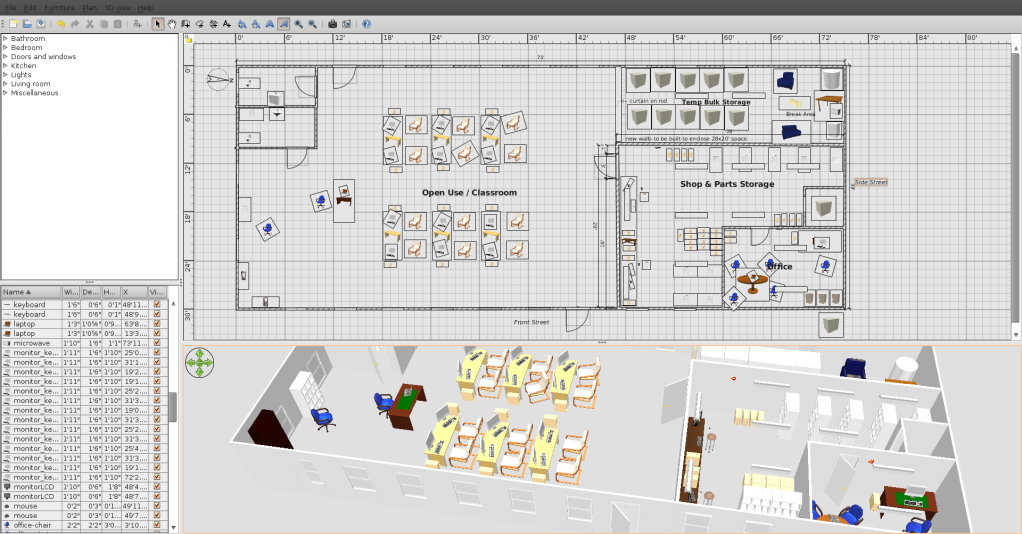
Now here’s the really amazing part. In just a few minutes I was actually able to draw all my exterior walls and add a couple of entry doors that were shown on my photocopy source. Now I had a starting point. After getting a couple of new interior walls added that we would need to use this building, I started adding furniture type items. Work benches in the shop. Shelves in the storage area. Desks into the office. Some tables in the class room area. I actually placed sinks and toilets in the bathrooms and then even put computers next to the classroom tables. Monitors and keyboards on the tables. The whole thing is all drag and drop oriented. This was almost fun.

You can also modify the object in the library (all future usage) or in the floor plan (current usage only). Modifying an object in the library however does NOT update the instances of that object in the floor plan, though, so make sure it’s right before you drag 20 of them into your floor plan.

One of the things I really liked about this software was the viewing angle adjustable perspective (3D) image in the panel below the floor plan I was working on. It was being updated as I made changes. This allowed for a reality check to see that the object, say a table, actually appeared to be sized correctly..

On the SweetHome3D website I found several things I could use that didn’t come with the default package. Like 4 foot florescent lights, some other types of shelving and an office style desk. I especially liked the “Ubuntu wall clock” I found. You just download the .zip file someplace and then from the furniture top menu item select import furniture and point it to the .zip file. The SweetHome3D app will allow you to import individual objects (as I did) or entire libraries of objects. The process is pretty simple and is explained on the website.

By default the objects are grouped into categories called Bathroom, Bedroom, Doors & Windows, Kitchen, Lights, Living Room and Miscellaneous. I put all the objects I downloaded into the Miscellaneous group.

The SweetHome3D website lists over a dozen other sites where you can download more objects or collections of objects.

I liked the fact that I could change the name of an object to call it by the name that I know the item as (Desk vs. Bureau). If you want something to be above floor level, like my 4-foot fluorescent light strips, you need to set the elevation of the object. Other objects, like a laptop, you can set down on top of a table or desk.

All the object size parameters can be specified in metric or in SAE measurement units. A text box can be placed anyplace on the floor plan but seems to be limited to horizontal orientation only. Size can be modified and can be set for bold or italics but that seems to be about it.

Now for my purpose, creating a floor plan quickly and sending the result to someone who probably does not have this software, SweetHome3D was able to print my floor plan on my default printer (a Samsung mono laser) without any issues or special set up. It also has options to print the 3D image and a list of all the furniture and other objects used, if this is desired. A really pleasant surprise was that it also contains an option to “Print to pdf” which I used to email my new floor plan off without having to call and obtain the fax numbers of the recipients! I’m a happy camper.

I’m continuing to play with this floor plan a bit as I’ve received some good suggestions from some of the HeliOS crew once I emailed them the PDF of my floor plan and 3D image. I know there are a lot of other features that I haven’t touched... like locking down a base plan, importing complete models, messing with the compass, etc. etc. I haven’t even read anything yet on how to create new objects but I suspect you might do that outside of this tool.

In fact, as I was writing this I found out that I can take the panel that contains the 3D-image and make it a separate window, allowing me to float it over my floor plan. But , to switch back to the floor plan I have to close the window, which docks it back into a panel in my SweetHome3D window. I might like the ability to toggle between the two windows.

This tool seems to be all Java based so expect the occasional slight hesitation (not often and not long enough for me to complain) even on my fairly fast quad desktop with a fairly hefty video card in it. Mostly when flipping between editing furniture objects and dragging them around. One caution; when intending to delete an object from your floor plan make SURE it’s selected on the floor plan! If you have the object selected in the library, you’ll delete it from there!

Below is a sample screen shot of the 75’ x 30’ building I was working with.


Using the “print to pdf” option gives you a page for the top floor plan panel and another page for the lower panel containing the 3D (perspective) image. I didn’t include the table of objects that you can see in the lower left of the screen, so that might be a 3rd page in the pdf had I chosen it.


In summary...

Is this real CAD software? From what little I know about CAD, No!

Is it a great, easy to use, simple to set up tool for doing quick floor plans? Yes! I am the ‘idiot test’ on doing this sort of work. This one passes with flying colors.

Skip


Thursday, January 13, 2011

How young is too young?

I recently received some mild criticism from a friend when I stated that The HeliOS Project provided a computer for a family with 3 kids ranging in age from 6 - 9 years old.

He said that we had wasted a computer on kids that were far too young to either appreciate the technology or use it efficiently.  I don't only think he is wrong...

I know he is.

I didn't argue the point with him...he's not an educator nor is he vaguely involved in technology via his profession.  I wasn't nearly as concerned about his criticism as I was about his attitude.

I think that exposing a child to technology should be done as soon as there is a cognizant communication ability between child and parent.

I only have emperical data to support my point.

When I decided that I wanted to live and work in the computer technology field, I was fairly late to the game...somewhere around 2002.  Of course, I began my self-education on a Windows machine and as I believe most people should, I evolved to learn outside of my knowledge base.  I began to explore Linux.

My daughter Amanda Brooke was 2 when she insisted in being lifted to my knee as I worked at a DOS prompt.  We would take breaks intermittently to play pinball games and later, Childsplay and an occasional game of Frozen Bubble or Planet Penguin Racer.  We did this for at least two hours a night, 7 nights a week and we did it for years.

She squealed with delight every time tux "ate" a fish and made the popping sound.

I didn't "push" my daughter into tech, math or science...but you would have a difficult time convincing me that early exposure to technology didn't have a lot to do with it.

In fact...I don't think anyone could.

And there isn't a week that goes by that we don't hear from parents or guardians...receiving reports on how grades have improved.  Not only grades, but whole attitudes about school and education.  In a few cases, we have seen chronic truants at the middle school or high school level begin to take their studies more seriously.

I know as well as you do that many of the kids we give computers to more than likely use them for gaming and social activity....far more than they use them for academic pursuit.

We are dealing with pre-teen and teen kids after all.

But the fact remains that they now have the tools.

Skip Guenter and I do week-long computer labs during summer vacation.  The kids range from 4th to 6th grade.  When I first intro the class. I walk among the seated children and then I point to one of them and I say:

"You are going to be the first person to walk on Mars."

I point to another and state:

"You are going to discover an herbal compound that cures diabetes."

And to a third child I point and say:

"You are going to invent the nano technology that reverses blindness."

Then I make sure that they understand one thing.  Unless they embrace and learn about the machines in front of them, none of that is likely to happen.

My youngest daughter Amanda is a senior at Crockett High School in South Austin.  Since she is bound to read this and give me grief over it, I won't be a boastful Dad and blurt out her SAT scores.  Her grade average is 3 point holy-crap!

And trust me...her intelligence is not inherited...at least not from my side.

But I will tell you this.  She is being courted heavily by several major universities.  I believe she is leaning hard toward Rice.

They want her to study either sustained energy or nuclear engineering.

You go baby...you go...

While I write this, the memory wraps itself warmly around me...

The weight on my knee and the giggles as tux pops another fish.

All-Righty Then

Friday, January 07, 2011

The Right Geek Skills Can Make You a Troublemaker...

Alan Jones has traveled a long way to be here.  His route is as interesting as it has been long.  From Australia to London, a prolonged stay in Santa Barbara and then, to Austin...

What a long, strange trip it's been.


He plans to be here for a while.  He's got a sweet gig.

Alan is the R&D Supervisor for Troublemaker Studios and he works for the well-known Robert Rodriguez.  Rodriguez is a film director, screenwriter, producer, cinematographer, editor and musician.  From movies that fit comfortably into the Walt Disney template...for instance the Spy Kids movies, to gritty thrillers like Machete and Grindhouse, Rodriguez has succeeded in making movies people want to see...

And he does it with a style that is, let's say...different.

I mean Cheech Marin as a priest?  Really?

Robert Rodriguez pulls it off beautifully.

Wouldn't it be fantastic to work for someone like that?

Well, there is a strong possibility that 1 - 4 Geeks could have that chance.

Alan Jones is going to hire people with C++ and SQL talents and he's asked me to put the word out.  What follows is the call for resumes and interviews.

Me?  Please...C++ was what I got in Trig.

See below for the information about getting a gig with Troublemaker:

We are currently looking for programmers for a 3-6 month contract
on-site at Troublemaker Studios in Austin, Texas.


The following experience criteria apply

Expert level:
* C++
* Qt (4 - ideally including up to 4.7)
* SQLite 3

Familiarity with:
* Cross platform development - Linux will be the primary target, but
OS X and Windows will also be required
* Network communications (esp ssl, compressed data streams, and serialization)
* CMake

Desirable:
* CTest, CPack, and CDash
* DAGs (possibly Boost Graph Library)
* OpenGL inside Qt (libqglviewer a bonus)
* ffmpeg
* clustering

The projects to be developed under this project are to be licensed
under the AGPLv3, and you can find some details on the projects at
http://conspire.sf.net
http://strife.sf.net

In-progress development documentation is available for Strife under
its git repository for those interested in reading more details about
the project.

Please send applications and inquiries to alan@troublemakerstudios.com

All-Righty Then

Wednesday, January 05, 2011

They Arrive in Waves...

Look...I know I chose my profession.  Any wounds suffered in doing my job are largely self-inflicted...

I know that.

But still, there are times that I either have to vent or vaporize.


So just a short sharing of a tale to slow the boiling pot to a simmer.

While I fill my unpaid role as founding director of The HeliOS Project, I also need to tend to the business of making a living.  I do so by accepting short-term contracts with the likes of AMD, Motorola and a to-be-un-named vendor at Fort Hood Texas.

It pays the bills but there aren't always contracts available so I fix people's computers for them.

Windows computers mostly.

So when a customer called and asked me if I could fix her laptop computer, of course I said yes.

Let's call her Beth.

Beth was getting a Blue Screen of Death upon boot.  It used to be only every once and a while but now it was every time she tried to boot her computer.  She dropped it off and I told her I would call her when the problem was diagnosed.

It was pretty easy.  An attempt to boot a live CD proved out the Nvidia chip on her motherboard had tanked.  This is a common problem with the HP 6000 series laptops. 

I called her up and told her that the machine would be more expensive to fix than to replace.  She groaned and then asked me if I could provide her a decent desktop unit.

I have a couple lying around...I said yes.

I put her together a decent Dell Dimension 4700 with a 3 gig hyperthread CPU, 3 gigs of RAM and a 160 gig hard drive.  I installed Linux on it with a VirtualBox set up with her Windows XP SP3 install disk.  When she came by to pick it up, I spent 30 minutes showing her around her new system, how to access Windows and how to install new software in Synaptic.

I pulled her hard drive, recovered her files and made sure there was nothing corrupted on the HD.

She was happy and I made a few bucks.

Let's revisit the "she was happy" part.

She hadn't been gone 2 hours when I got the call.

"This computer won't connect to the Internet."

"OK." I said.  "Is it plugged into the router."

Long silence.

"No, it doesn't need to be."

Long silence on my end.

"Uh, yes it does.  The computer gets its connection by being plugged into the cable modem or router.  There's no way it is going to work otherwise."

Here comes the tirade....

She launched into me with all 4 feet, claws extended.

"Of course it's supposed to connect.  Every computer I've ever turned on in this house has connected and I didn't need to plug anything into it.  Are you sure you know what you are doing?"

Facepalm.  No...double facepalm.

"How many computers have you ever used in your home" I asked.

"Three" she replied.  "My Ex never had to do anything to get them connected, they just worked immediately with the internet."

I groaned inwardly.

"Were they all laptops."

"Well yes, they were".

As it turned out, her "Ex" did everything for her, to include setting up wireless on her previous laptops, installing all her apps and taking care of any virus or malware problems she conjured.

 "Beth" had no concept of wireless devices, dongles or routers.  As far as she was concerned, an Internet connection consisted of Fairy Dust that floated in the air until it found an unconnected computer. 

When I told her that she needed to run a cat5 cable from her router to her computer, she acted like I had just handed her a scalpel and a brain surgery schedule.

She insisted that when she turned on her desktop, it should automagically find an Internet connection and connect to it.

I then tried to explain how she could get a wireless card or dongle and connect...but oh no...I was an incompetent idiot who didn't have a clue as to how a computer works or how an internet connection is acquired.

I offered to give her money back and take back the computer but she got snitty and said she would take it to a REAL computer tech at Best Buy.  There were several colorful adjectives for the word idiot bestowed upon me before she hung up.

OK...fine by me.  Let them deal with her.

So the phone rang yesterday afternoon and it was a young lady who wanted to know why her new Acer laptop wouldn't connect to the Internet and would I mind taking a look at it.  We had fixed her mom's computer and our number had been offered her.

As we are still getting caught up with HeliOS Project installs I politely declined...and mumbled something about contacting their website.  She asked me if I had any ideas as to why it wasn't working and I said yes, I might.

I told her that Acer probably forgot to put the Internet inside of it.

She warmly thanked me and hung up the phone.

I poured myself a 2 PM 4 finger dram of MacAllan and counted my blessings.

All-Righty then...

Saturday, January 01, 2011

A New Year's Eve Reflection...

To my friend Jean in France...thank you.

It's quiet here.

But of course it would be...the evening is young.  It's New Year's Eve and those who seek the night's pleasures are just stepping into the batters box.


Diane is in the living room, watching a documentary on Mark Twain.  I've just finished a couple of install scripts that will come in handy in the next few months.

It's quiet here...

I've allowed myself an annual guilty pleasure.  I've splurged on a 12 year old bottle of MacAllan scotch...aged in Sherry casks from Jerez Spain. As I sit here reflecting on the past year, the warmth from that bottle begins to settle in. 

We don't go out on New Year's Eve.  I personally gave up the ritual a few years back.  The jostling crowds and blaring music on Sixth Street just does not have the appeal it used to.

Besides that, I simply don't see any real reason to celebrate.

It's just a moment in time we've chosen to note a mile marker of our passing.

I do see this date on the calendar as an opportunity to look at where we've been and a tool to gauge where we want to go.

2010 has been a decent year for us.  While this wasn't our largest year for computer installs, it has been a year of confirmations and validation.  296 computers were given away by The HeliOS Project in 2010...

That took us past a mile marker of sorts in itself.  To date, we've placed 1208 Linux-powered computers to Austin kids that needed them most.  We were honored to receive the Dewey Winburne Community Service Award, we were featured on the front page of The Austin American Statesman and we began negotiations with the city of Taylor for a long-term lease of our own building.

But through it all, it has been the Linux and Open Source Community that made this happen.  Through your support of Linux Against Poverty and various other events, you insured that we had the equipment and funding to do our job.

And to be honest, the middle of November saw us at the lowest point we've been since we started doing this.  We were out of machines, we were out of money and morale was pretty low.

But then Fate smiled upon us.

St. Jude Medical donated 75 laptops to The HeliOS Project and with only 4 days left until Christmas, we were faced with delivering 13 promised computers.  Recipients were spread out from Georgetown to San Marcos Texas.  We drove hundreds of miles and at all hours of the day to get them delivered, but get them delivered we did.

You folks paid for the fuel and associated costs to get this done.  Without you, those computers would still be loaded in the back of the Explorer, waiting to find a home.


On Christmas Eve and Christmas Day, we delivered the last three.  Joi and her son Jack were the last install of 2010.  Jack is an honor roll student, looking forward to entering Middle School next year and with a Dell D610 laptop from The HeliOS Project, he can go forward with confidence.

And his mom has one less thing to worry about.


In the meantime, we had a backlog of requests for laptops.  They were mostly students preparing to enter college or trade schools.  Unfortunately, many of them had already moved or had begun college and had not provided us a forwarding address.


Shea Collis was fortunate.  Through a friend of The HeliOS Project, we were able to track her down.  She is living with her mom in Houston Texas and has just helped finish building their house via Habitat for Humanity.

Shea is an advanced placement student and has yet to choose her school but with her grades, she will have colleges knocking on her door.  It was a pleasure to help this young lady out.

Her grades are so good, she was able to skip an entire year in high school.  She will graduate having only attending three years...and still, she remains in advanced placement.

2011 will of course have its challenges.  We should become our own 501(c)(3) by the end of January.  The end of that month should see us moving into a new home and begin teaching various computer classes in several Williamson County locations.

Of course, everything we do will be focused on the Linux Operating System.  It would be the most irresponsible of acts to ignore the importance of Linux as we watch these young people become our future.

A future that you are helping us build.

All-Righty Then...